Prowl Rendering
MIT License 1.0 Preview

Build and ship
games in pure C#.

A fully featured 3D game engine, PBR rendering, shader graph, terrain, physics, audio, and a complete editor. MIT licensed, no royalties, full source access. Ready for your next project today.

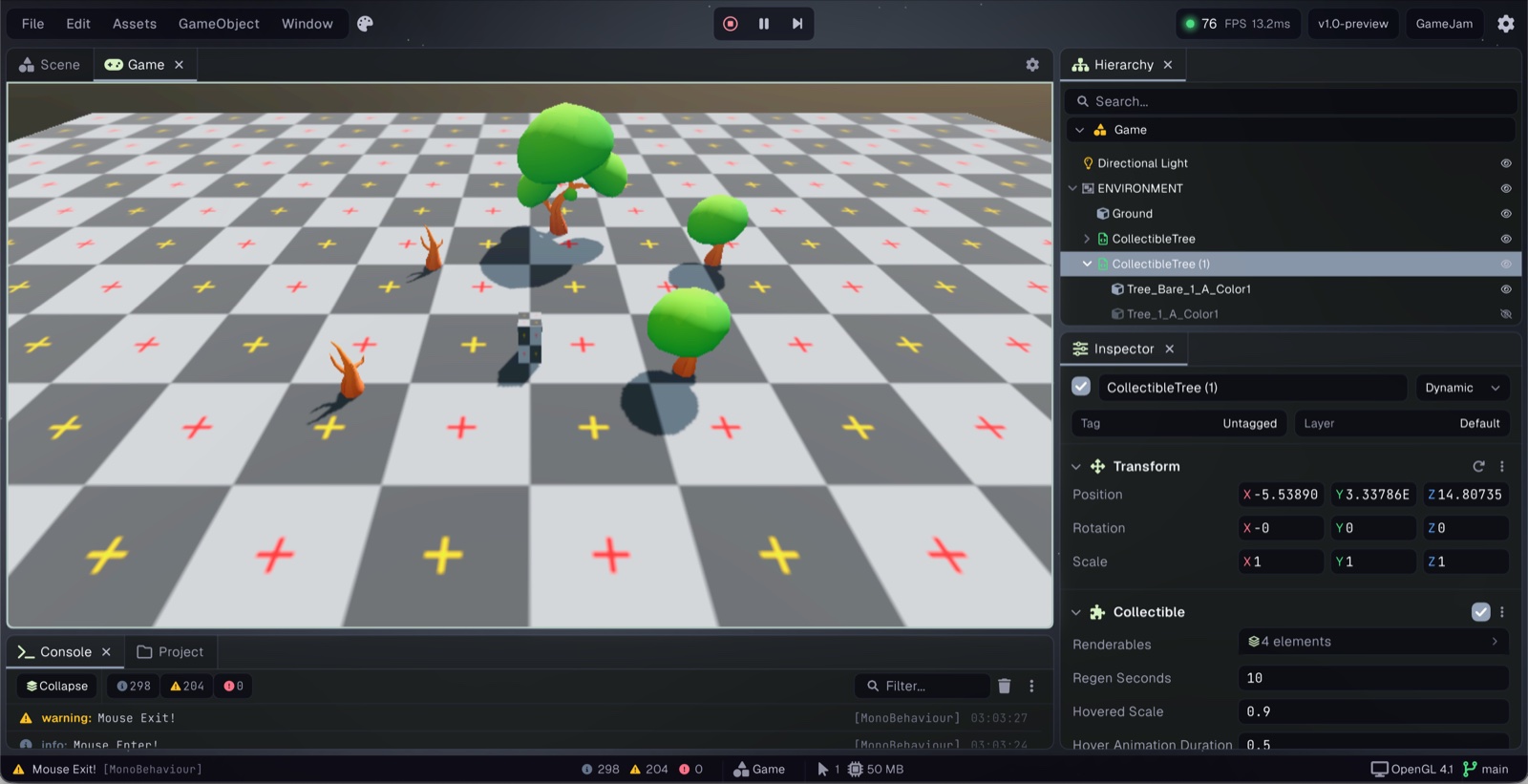
Prowl Editor
Prowl Editor

The C# Difference

One language.
Zero boundaries.

Most engines split you in two: the engine lives in C++ and your scripts live somewhere else, separated by a binding layer with overhead, friction, and a wall you can't see past. Prowl removes that wall entirely. Engine code and game code are the same language, the same binary, and equally readable.

No FFI overhead

Your game code calls engine code directly. No marshaling, no native interop layer, no serialization round-trip. It's all one IL binary.

The engine is readable

Every system, renderer, physics, audio, ECS, is plain C# you can open, read, and change. KISS principles throughout. No black boxes.

Scripts are first-class

Components you write have exactly the same capabilities as built-in engine components. There is no privileged internal API, only public C#.

Tooling just works

Prowl projects are standard .NET .csproj files. Rider, VS Code, and Visual Studio open and debug them as-is, no plugin, no special extension, no ceremony.

PlayerController.cs C#
using  Prowl.Runtime;

// Your component. Engine component. Same thing.
public class PlayerController : MonoBehaviour
{
    public float speed = 5f;
    private RigidBody3D rb;

    void Start()
    {
        // No reflection magic, direct reference
        rb = GetComponent<RigidBody3D>();
    }

    void FixedUpdate()
    {
        var input = Input.GetAxis("Horizontal");
        rb.AddForce(Vector3.right * input * speed);
    }
}

The Prowl Ecosystem

Built from a constellation
of MIT C# libraries.

Prowl isn't a monolith. Every subsystem is its own standalone, MIT-licensed C# library, usable independently, replaceable, and readable. The engine is the assembly.

ProwlCORE ENGINEC# MIT Editor + RuntimeProwl.PaperImmediate Mode UIProwl.QuillHW-Accel Vector GraphicsProwl.GraphiteGraphics AbstractionProwl.Echo.NET SerializerProwl.ScribeTTF Parser & RasterizerProwl.Vector64-bit Math LibraryProwl.Drift2D PhysicsProwl.BridgeLow-Level NetworkingProwl.SurfaceCross-Platform WindowingCore dependencyLibrary dependency

Every box is a standalone, MIT-licensed C# repo under github.com/ProwlEngine

Standalone Libraries

Use any piece on its own.

Each library in the Prowl ecosystem is independently useful. Pull just the one you need, none of them require the engine to run.

Come as you are.
The editor works today.

Everything is open. Clone the repo, read the source, file an issue, open a PR. There are no gatekeepers, just the code and the people writing it.

Core Engine

Runtime + Editor

Full editor running. PBR, terrain, particles, physics, audio, all functional today.

Scripting

C# 14 .NET 10

Native C# components. No separate runtime. Full .NET access in scripts.

License

MIT

Engine, editor, and all Prowl.* libraries. No royalties, no strings.

What's included

A full engine, not just a framework.

Prowl ships with everything you'd expect from a production engine.

Rendering

  • PBR with metallic workflow
  • Node-based shader graph (150+ nodes)
  • Cascaded shadow maps (4 cascades)
  • Skinned mesh + bone animation
  • GPU instancing & frustum culling
  • Dedicated render thread

Post Processing

  • HDR tonemapping (ACES, AgX, Filmic)
  • Bloom, FXAA, TAA
  • GTAO ambient occlusion
  • Stochastic screen space reflections
  • Bokeh depth of field
  • Volumetric fog

Editor

  • Scene, hierarchy, inspector, console
  • Dockable, resizable panels
  • Transform gizmos & undo/redo
  • Custom component editors
  • Play-in-editor
  • Theming with custom color palettes
  • Script hot-reloading

Physics & Audio

  • Jitter Physics 2 (box, sphere, mesh)
  • 7 constraint types + character controller
  • Raycasting & shape casting
  • Spatial 3D audio via MiniAudio
  • WAV, MP3, OGG, FLAC
  • Effect chain (reverb, delay, filter)

World Building

  • Terrain with quadtree LOD
  • Heightmap & splatmap painting
  • GPU-instanced grass & tree LOD
  • Particle system (GPU instanced)
  • Prefabs with nested prefab support
  • Baked lightmaps & light probes

Platform & Build

  • Windows, Linux & macOS
  • Build to standalone with packed assets
  • GUID-based asset pipeline
  • Input action system with composites
  • GLTF, GLB, OBJ, PNG, HDR, EXR
  • Script compilation via dotnet build